Running tasks manually
Context
Instead of using the one script (workflow.py) that executes the Luigi Workflow Orchestration as shown in
Step 2 of the main README.md,
this documentation will break down the tasks in the script so that it can be run individually and manually.
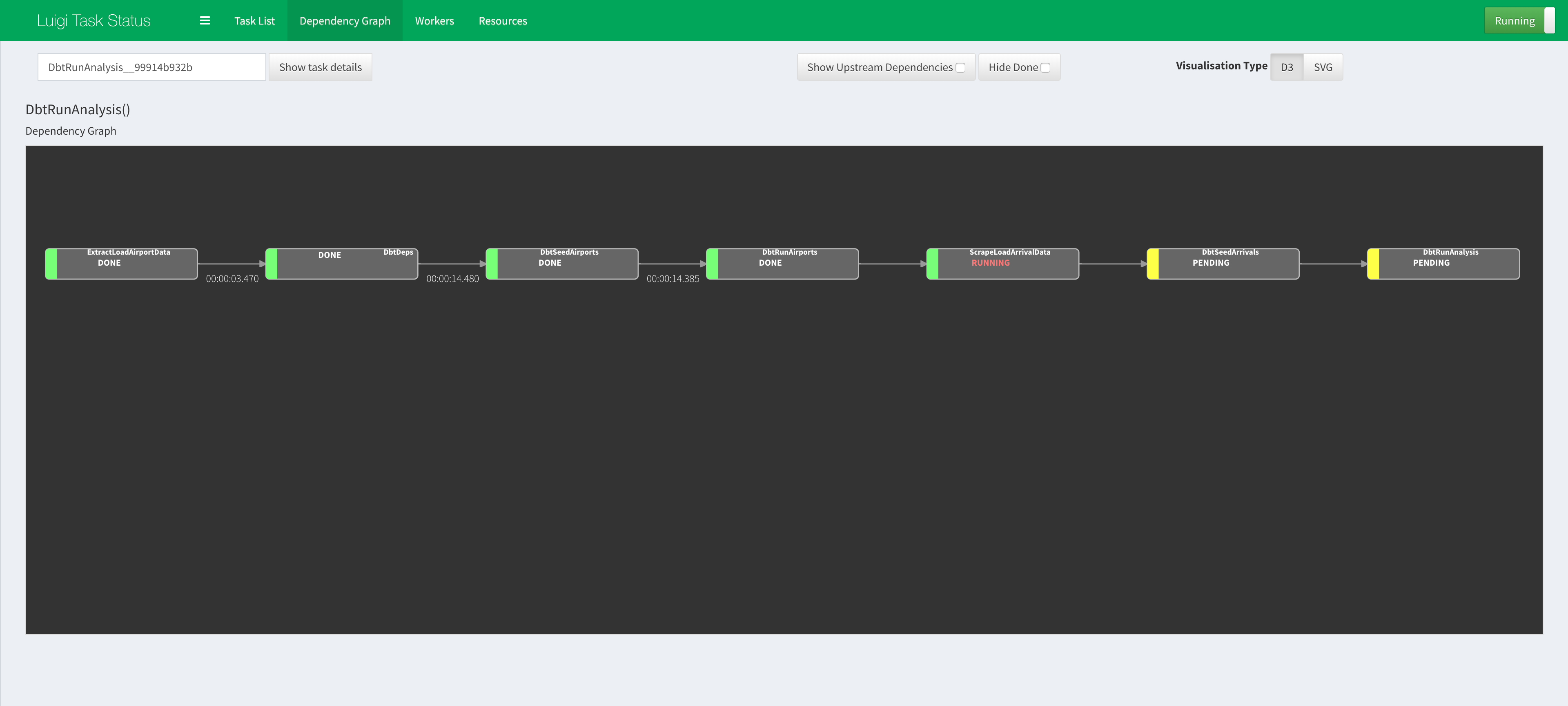
Running Luigi tasks manually
Step 1. ExtractLoadAirportData
- Execute python script to extract airport data from website link and load into database:
  # In the root of project directory:
  $  python ./extract_load/airports.py
Step 2. DbtDeps
- Install the dbt dependencies:
  # If not in the dbt directory:
  $ cd ./dbt/

  # In the ./dbt directory:
  $ dbt deps
Specifically, we will be using macros from dbt_util in our custom macros that are ultimately used in the SQL queries to forms our final analytics tables.
Step 3. DbtSeedAirports
- Use dbt to easily seed CSV files stored locally:
  # In the ./dbt directory:
  $ dbt seed --profiles-dir ./
This alternative to using SQL Alchemy in Python scripts to upload to the databases.
In this step, dbt will upload the
./dbt/data/raw_airports.csvto the database.
Step 4. DbtRunAirports
- Run dbt that cleans the Airport data to be used in later steps to scrape arrival data (using airport iata/icao code):
  # In the ./dbt directory:
  $ dbt run --profiles-dir ./ --model tag:cleaned_airports
In this step, dbt will compile and execute the SQL Query to create:
- base_airports table.
Step 5. ScrapeLoadArrivalData
- Execute python script to extract arrival data from website link and load into database:
  # In the root of project directory:
  $ python ./extract_load/arrivals.py
The script in this step will query the table in the database created in Step 2.4 above to obtain the airport codes (iata/icao) and use them to loop through the arrival data website.
Note:
Step 6. DbtSeedArrivals
- Use dbt to easily seed CSV files stored locally:
  # In the ./dbt directory:
  $ dbt seed --profiles-dir ./
In this step, dbt will upload the
./dbt/data/raw_arrivals.csvto the database.
Step 7. DbtRunAnalysis
- Run dbt that cleans the Arrival data and Transform the tables to its Factual Tables for analytics:
  # In the ./dbt directory:
  $ dbt run --profiles-dir ./ --exclude tag:cleaned_airports
In this step, dbt will compile and execute the SQL Query to create:
- base_arrivals__malaysia table.
- stg_airports__malaysia_distances table.
- fct_airports__malaysia_distances_km table.
- fct_arrivals__malaysia_summary table.